

▶ 응용 과제 1
startupProbe가 실패 되도록 설정해서 Pod가 무한 재기동 상태가 되도록 설정해 보세요.
(여러분들이 가장 많이 겪게될 Pod 에러입니다)
기존 Deployment 의 startupProbe
startupProbe:
	httpGet:
		path: /ready
		port: http
		scheme: HTTP
	timeoutSeconds: 1
	periodSeconds: 10
	successThreshold: 1
	failureThreshold: 20
- timeoutSeconds : 프로브 요청의 타임아웃 시간
- periodSeconds : 프로브 요청 시간
- successThreshold : 몇 번 성공했을 때 성공으로 간주할지
- failureThreshole : 몇 번 실패까지 기다릴지
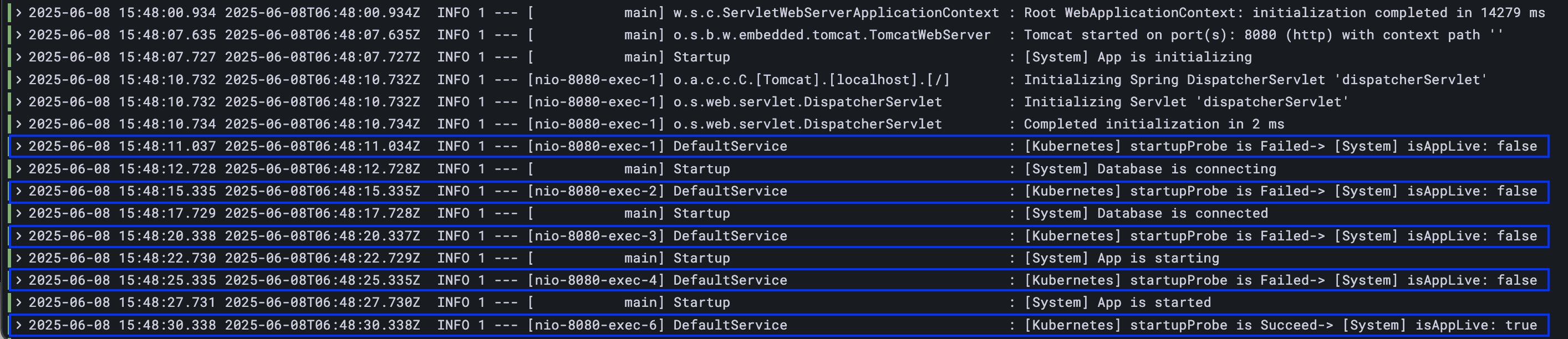
실제 Pod 의 로그를 보면 startUpProbe 가 4번 실패하고, 5번째에서 성공 !!
=> failureThreshole 를 낮춰서 1번으로 낮춰서 실패하는지 확인하기
startupProbe:
	httpGet:
		path: /ready
		port: http
		scheme: HTTP
	timeoutSeconds: 1
	periodSeconds: 10
	successThreshold: 1
	failureThreshold: 1

pod가 CrashLoopBackOff 상태로 계속 restart 됨
💥CrashLoopBackoff 상태는 Kubernetes에서 Pod가 계속해서 크래시(충돌)되고 자동으로 재시작되지만, 일정 횟수 이상 실패하면서 재시작 간격을 점점 늘려가는 상태
▶ 응용 과제 2
일시적 장애 상황(App 내부 부하 증가)가 시작 된 후, 30초 뒤에 트래픽이 중단되고,
3분 뒤에는 App이 재기동 되도록 설정해 보세요.
(아래 API를 날리면 readinessProbe와 livenessProbe가 동시에 실패하게 됩니다)
// 부하 증가 API
curl http://192.168.56.30:31231/server-load-on
// 외부 API 실패
curl http://192.168.56.30:31231/hello
// 부하 감소 API
curl http://192.168.56.30:31231/server-load-off
문제
부하가 생긴 후
- 30초 후 트래픽 중단 (readliness 실패)
- 3분 후 앱 재시작 (liveness 실패)
| 시간 | 동작 | 해당 probe |
| 0초 | 부하 시작 | readiness + liveness 실패 |
| 30초 | 서비스 제외 | readliness 실패 3회 -> 10초 간격 -> 30초 소요 |
| 3분 | 앱 재시작 | livenessProbe 실패 3회 -> 60초 간격 -> 3분 소요 |
기존 코드
livenessProbe:
  httpGet:
    path: /ready
    port: http
    scheme: HTTP
  timeoutSeconds: 1
  periodSeconds: 10
  successThreshold: 1
  failureThreshold: 3
readinessProbe:
  httpGet:
    path: /ready
    port: http
    scheme: HTTP
  timeoutSeconds: 1
  periodSeconds: 10
  successThreshold: 1
  failureThreshold: 3
startupProbe:
  httpGet:
    path: /ready
    port: http
    scheme: HTTP
  timeoutSeconds: 1
  periodSeconds: 10
  successThreshold: 1
  failureThreshold: 10
- 현재 설정된 readinessProbe 는 10 * 3 = 30초
- 현재 설정된 livenessProbe 는 10 * 30 = 30초
-> livenessProbe 가 3분이 되어야하므로 periodSeconds 를 60으로 늘리기
변경된 코드
livenessProbe:
  httpGet:
	path: /ready
	port: http
	scheme: HTTP
  timeoutSeconds: 1
  periodSeconds: 60
  successThreshold: 1
  failureThreshold: 3
▶ 응용 과제 3
Secret 파일(/usr/src/myapp/datasource/postgresql-info.yaml)이 존재하는지 체크하는 readinessProbe를 만들어 보세요.
(꼭 API를 날리는 것만이 readinessProbe 활용의 전부는 아닙니다)
기존 코드
readinessProbe:
  httpGet:
	path: /ready
	port: http
	scheme: HTTP
  timeoutSeconds: 1
  periodSeconds: 10
  successThreshold: 1
  failureThreshold: 3
변경된 코드
readinessProbe:
  exec:
	command: ["cat", "/usr/src/myapp/datasource/postgresql-info.yaml"]
  timeoutSeconds: 1
  periodSeconds: 10
  successThreshold: 1
failureThreshold: 3- exec 라는 속성으로 command 를 Pod 에 날릴 수 있다
- App 기동시 필요한 파일이 있는지 체크
'🌱 인프런 > ⚓ 쿠버네티스 어나더 클래스 (지상편)' 카테고리의 다른 글
| [미션4] Application 기능으로 이해하기 - PVC/PV, Deployment, Service, HPA (0) | 2025.06.08 |
|---|---|
| [미션3] Application 기능으로 이해하기 - Configmap, Secret > 응용과제 (0) | 2025.06.08 |
| (8) Component 동작으로 이해하기 (0) | 2025.06.08 |
| (7) PV/PVC, Deployment, Service, HPA (1) | 2025.06.08 |
| (6) Configmap, Secret 이해하기 (2) | 2025.06.08 |