

⚓ 쿠버네티스 어나더 클래스 (지상편) - Spring 1, 2 을 듣고 작성하는 복습 블로그 입니다.
1. Object 그려보며 이해하기
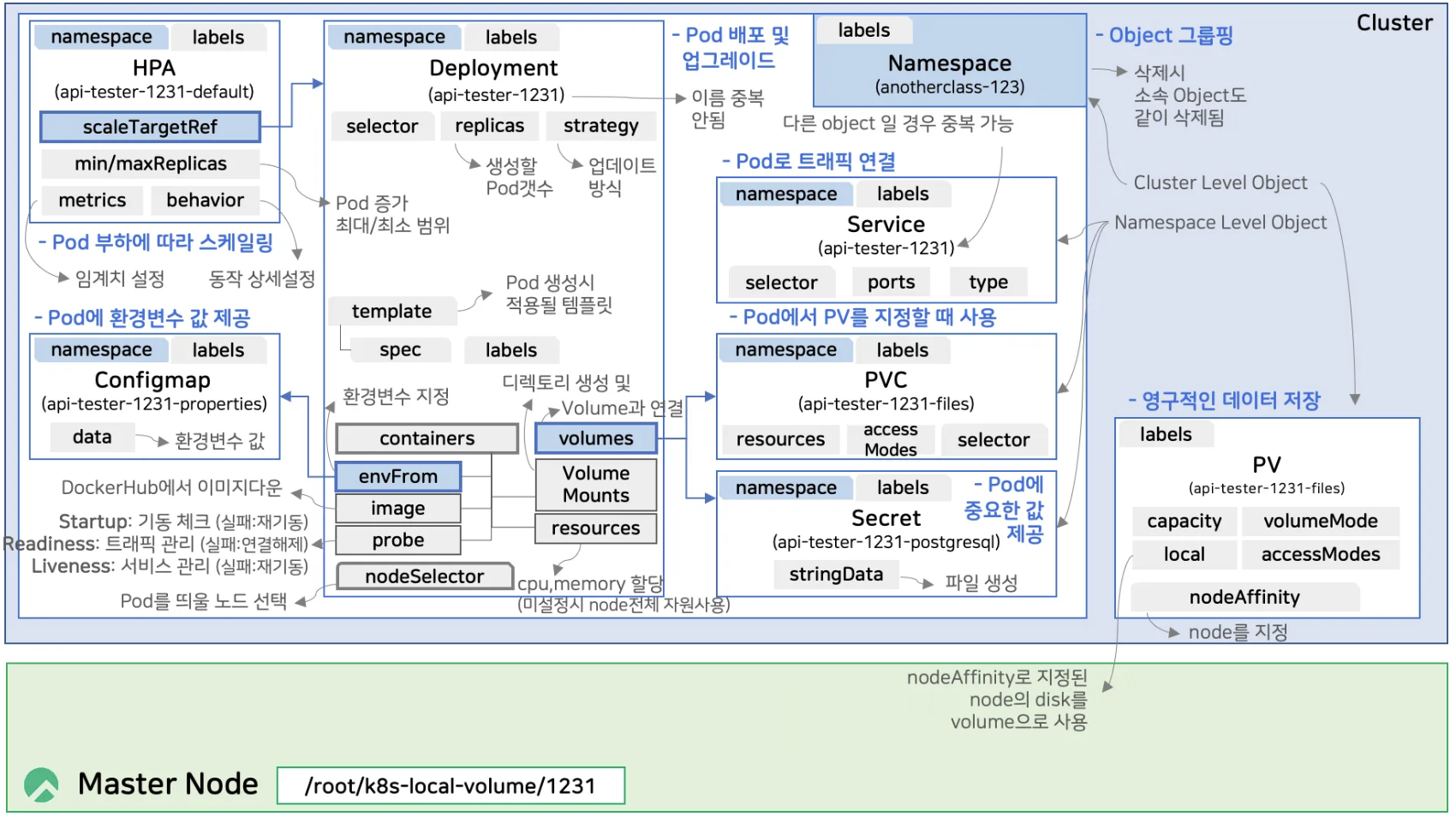
각 Object 별 기능 간단 정리 ⬇️
| Object 명 | 기능 |
| Deployment | Pod 를 만들고 업그레이드 해주는 역할 |
| Service | Pod 한테 트래픽을 연결시켜주는 역할 |
| ConfirMap | pod 의 환경변수 값을 제공하는 역할 |
| Secret | pod 에 좀 더 중요한 환경변수 값을 제공하는 역할 |
| PVC (PersistentVolumeClaim) | pod 에서 pv 를 지정할 때 사용 |
| PV (PersistentVolume) | 실제 Volume 을 지정하는 역할 |
| HPA | 부하에 따라 pod 를 늘려주고, 줄여주는 스케일링 역할 |
1. master node 에 접속해서 디렉토리 생성
mkdir -p /root/k8s-local-volume/1231
2. Namespace : Object들을 그룹핑해주는 역할
apiVersion: v1
kind: Namespace
metadata:
  name: anotherclass-123
  labels:
    part-of: k8s-anotherclass
    managed-by: dashboard
3. Deployment : Pod 를 만들고 업그레이드 해주는 역할
apiVersion: apps/v1
kind: Deployment
metadata:
  namespace: anotherclass-123
  name: api-tester-1231
  labels:
    part-of: k8s-anotherclass
    component: backend-server
    name: api-tester
    instance: api-tester-1231
    version: 1.0.0
    managed-by: dashboard
spec:
  selector:
    matchLabels:
      part-of: k8s-anotherclass
      component: backend-server
      name: api-tester
      instance: api-tester-1231
  replicas: 2
  strategy:
    type: RollingUpdate
  template:
    metadata:
      labels:
        part-of: k8s-anotherclass
        component: backend-server
        name: api-tester
        instance: api-tester-1231
        version: 1.0.0
    spec:
      nodeSelector:
        kubernetes.io/hostname: k8s-master
      containers:
        - name: api-tester-1231
          image: 1pro/api-tester:v1.0.0
          ports:
          - name: http
            containerPort: 8080
          envFrom:
            - configMapRef:
                name: api-tester-1231-properties
          startupProbe:
            httpGet:
              path: "/startup"
              port: 8080
            periodSeconds: 5
            failureThreshold: 36
          readinessProbe:
            httpGet:
              path: "/readiness"
              port: 8080
            periodSeconds: 10
            failureThreshold: 3
          livenessProbe:
            httpGet:
              path: "/liveness"
              port: 8080
            periodSeconds: 10
            failureThreshold: 3
          resources:
            requests:
              memory: "100Mi"
              cpu: "100m"
            limits:
              memory: "200Mi"
              cpu: "200m"
          volumeMounts:
            - name: files
              mountPath: /usr/src/myapp/files/dev
            - name: secret-datasource
              mountPath: /usr/src/myapp/datasource
      volumes:
        - name: files
          persistentVolumeClaim:
            claimName: api-tester-1231-files
        - name: secret-datasource
          secret:
            secretName: api-tester-1231-postgresql
- namespace: anotherclass-123 : 위에 만든 Namespace 소속이 된다.
- name: api-tester-1231 : 한 Namespace 안에서 중복되면 안됨
- replicas: 2 : pod 를 2개로 만든다
- type: RollingUpdate : deployment 기능의 핵심 (→ 다음 강의에서 설명 예정)
- template: : 여기 내용대로 pod 가 만들어진다.
- nodeSelector: : pod를 띄울 노드를 선택
- container: image : DockerHub 에서 이미지 다운
- envFrom: configMapRef: : Application 의 환경변수와 관련된 부분
- startupProbe: : App 이 잘 기동됐는지 체크, 기동이 안되면 App 을 재기동
- readinessProbe: : App 에 트래픽을 연결할 건지를 결정하는 속성
- livenessProbe: : App 이 정상이 아니면 재시작을 시킬건지 판단하는 속성 (중요)
- resources: : pod 하나에 CPU랑 memory 를 얼마나 할당할지
- volumeMounts: mountPath: : pod 내부에 만들어지는 디렉토리
- volumeMounts 의 name 과 volumes 의 name이 매핑된다.
4. Service : Pod 한테 트래픽을 연결시켜주는 역할
apiVersion: v1
kind: Service
metadata:
  namespace: anotherclass-123
  name: api-tester-1231
  labels:
    part-of: k8s-anotherclass
    component: backend-server
    name: api-tester
    instance: api-tester-1231
    version: 1.0.0
    managed-by: dashboard
spec:
  selector:
    part-of: k8s-anotherclass
    component: backend-server
    name: api-tester
    instance: api-tester-1231
  ports:
    - port: 80
      targetPort: http
      nodePort: 31231
  type: NodePort
같은 종류의 object 끼리 이름이 중복되면 안된다
Service 와 Deployment 는 서로 다른 object 라 이름이 같아도 된다
5. ConfirMap : pod 의 환경변수 값을 제공하는 역할
apiVersion: v1
kind: ConfigMap
metadata:
  namespace: anotherclass-123
  name: api-tester-1231-properties
  labels:
    part-of: k8s-anotherclass
    component: backend-server
    name: api-tester
    instance: api-tester-1231
    version: 1.0.0
    managed-by: dashboard
data:
  spring_profiles_active: "dev"
  application_role: "ALL"
  postgresql_filepath: "/usr/src/myapp/datasource/postgresql-info.yaml"
6. Secret : pod 에 좀 더 중요한 환경변수 값을 제공하는 역할
apiVersion: v1
kind: Secret
metadata:
  namespace: anotherclass-123
  name: api-tester-1231-postgresql
  labels:
    part-of: k8s-anotherclass
    component: backend-server
    name: api-tester
    instance: api-tester-1231
    version: 1.0.0
    managed-by: dashboard
stringData:
  postgresql-info.yaml: |
    driver-class-name: "org.postgresql.Driver"
    url: "jdbc:postgresql://postgresql:5431"
    username: "dev"
password: "dev123"- stringData : stringData 안에 있는 파일이 pod 안에 만들어진다.
7. PVC (PersistentVolumeClaim) : pod 에서 pv 를 지정할 때 사용
apiVersion: v1
kind: PersistentVolumeClaim
metadata:
  namespace: anotherclass-123
  name: api-tester-1231-files
  labels:
    part-of: k8s-anotherclass
    component: backend-server
    name: api-tester
    instance: api-tester-1231
    version: 1.0.0
    managed-by: kubectl
spec:
  resources:
    requests:
      storage: 2G
  accessModes:
    - ReadWriteMany
  selector:
    matchLabels:
      part-of: k8s-anotherclass
      component: backend-server
      name: api-tester
      instance: api-tester-1231-files
8. PV (PersistentVolume) : 실제 Volume 을 지정하는 역할
apiVersion: v1
kind: PersistentVolume
metadata:
  name: api-tester-1231-files
  labels:
    part-of: k8s-anotherclass
    component: backend-server
    name: api-tester
    instance: api-tester-1231-files
    version: 1.0.0
    managed-by: dashboard
spec:
  capacity:
    storage: 2G
  volumeMode: Filesystem
  accessModes:
    - ReadWriteMany
  local:
    path: "/root/k8s-local-volume/1231"
  nodeAffinity:
    required:
      nodeSelectorTerms:
        - matchExpressions:
            - {key: kubernetes.io/hostname, operator: In, values: [k8s-master]}
Cluster Level 의 Obejct
- local : 안에 있는 path 를 volume 으로 사용
- nodeAffinity : nodeSelector 와 같이 Master Node 를 지정한다.
9. HPA : 부하에 따라 pod 를 늘려주고, 줄여주는 스케일링 역할
apiVersion: autoscaling/v2
kind: HorizontalPodAutoscaler
metadata:
  namespace: anotherclass-123
  name: api-tester-1231-default
  labels:
    part-of: k8s-anotherclass
    component: backend-server
    name: api-tester
    instance: api-tester-1231
    version: 1.0.0
    managed-by: dashboard
spec:
  scaleTargetRef:
    apiVersion: apps/v1
    kind: Deployment
    name: api-tester-1231
  minReplicas: 2
  maxReplicas: 4
  metrics:
    - type: Resource
      resource:
        name: cpu
        target:
          type: Utilization
          averageUtilization: 60
  behavior:
    scaleUp:
stabilizationWindowSeconds: 120- kind: Deployment : 스케링 대상으로 Deployment 를 지정
- minReplicas: 2 : 최소 두 개의 pod 를 유지하고 있다가
- maxReplicas: 4 : 부하가 생기면 최대 4개까지 늘어나도록 설정
- metrics: : resource 에 따라 그 기준을 넘으면 스케일 아웃을 하라고 설정
- behavior: pod 가 한 번 증가를 한 후 pod 가 추가적으로 늘어나지 않게 하는 설정
- namespace 를 삭제하면 이 안에 있는 모든 Object 가 같이 삭제가 된다
kubectl delete ns anotherclass-123
kubectl delete pv api-tester-1231-files
- 그렇기 때문에 이 명령어만 실행해주면 된다
- pv 는 namespace 에 속하지 않기 때문에 별도로 한 번 더 삭제
2. Labels, Selector, Naming
- 앞 강의에서 설치했던 Promethueus 를 예로 설명
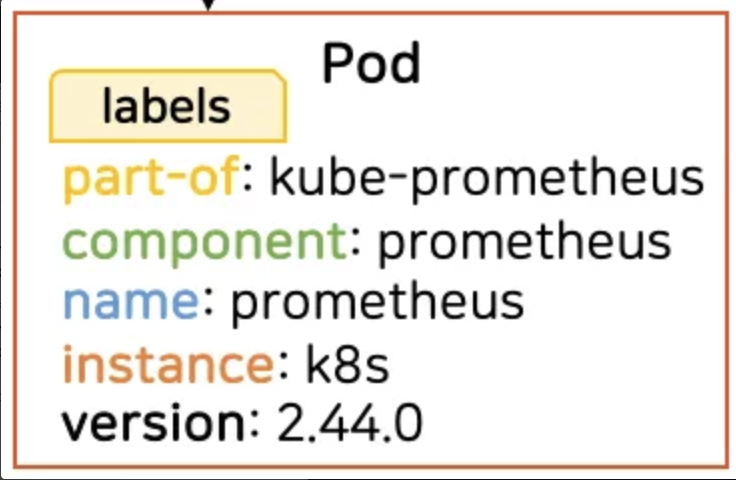
prometheus 를 설치하고 생성된 pod의 labels
- 라벨링 : 대상의 간단한 정보를 붙여놓을 때
- object 가 많아지면서 정보를 알기가 어려워진다.
- 오브젝트에 라벨링이 잘 되어 있으면 → object 에 걸려 있는 App 의 정보를 바로 파악할 수 있다.
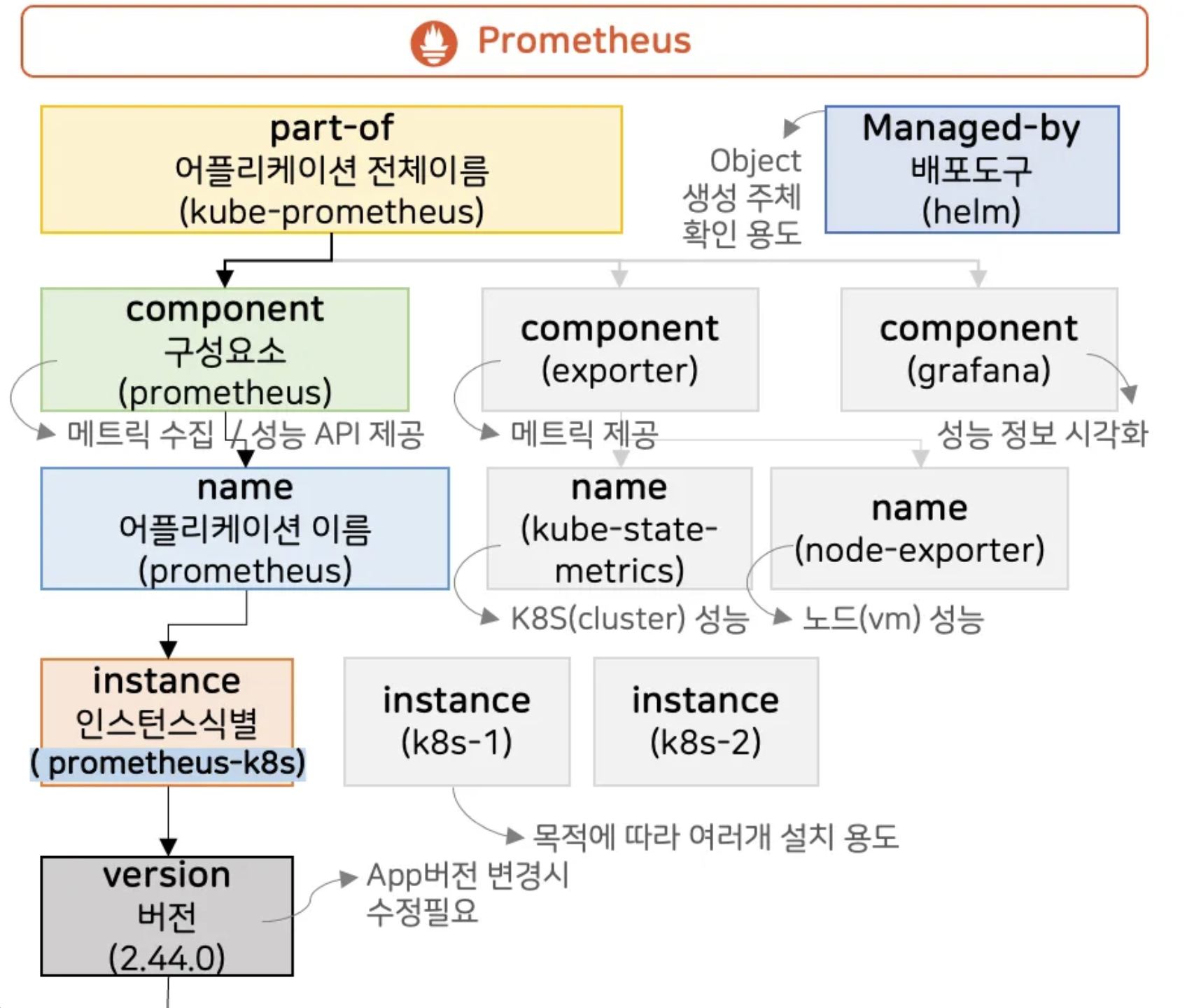
- part-of : 어플리케이션 전체 이름
- component (구성요소) : 서비스를 구성하고 있는 각각의 분리된 기능들
- name : 어플리케이션의 실제 이름
구성 요소 밑에 여러 종류의 name들이 있을 수 있다. - instance : 목적에 따라 여러개의 어플리케이션을 설치할 때 값을 다르게 줘서 사용
- version : App 버전이 변경되면 수정필요
- name : 어플리케이션의 실제 이름
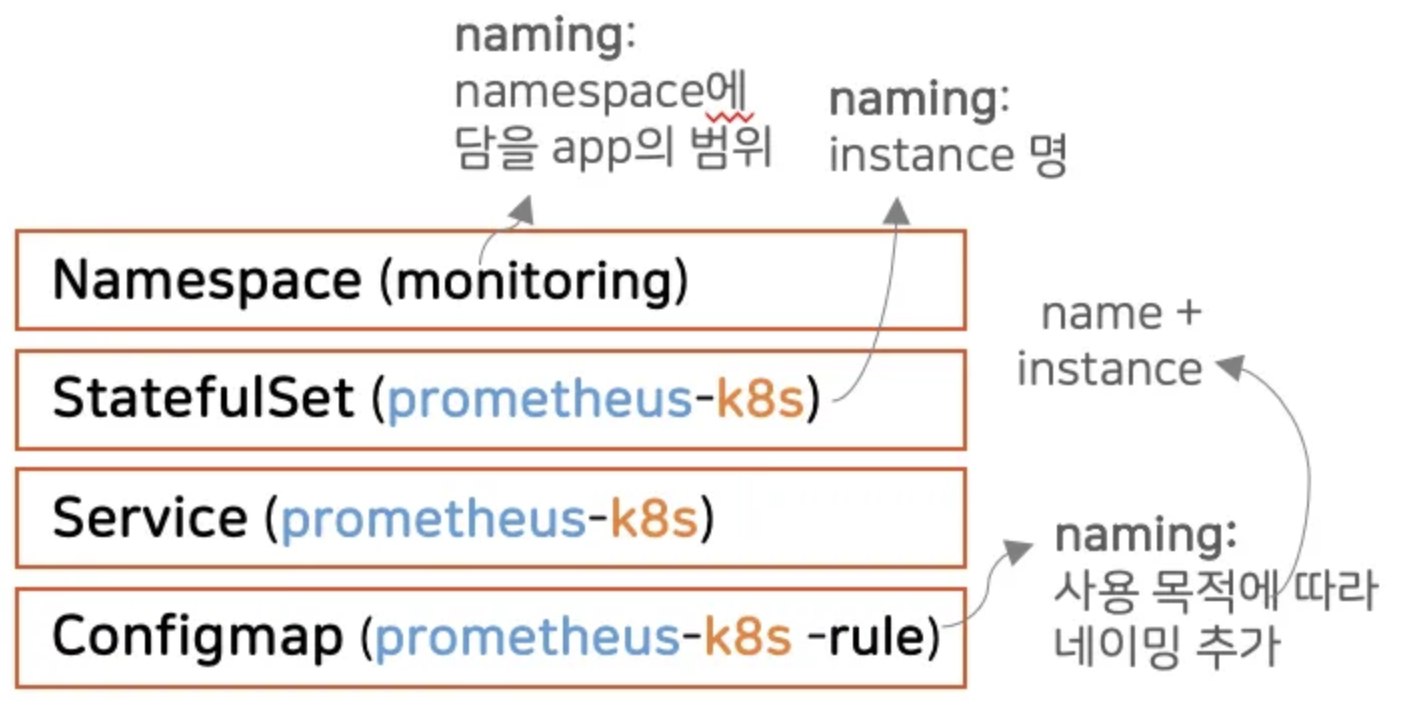
- 쿠버네티스의 object 에 대한 Naming
- 이름이 중복되면 안된다
- 일프로님이 권고주시는 Naming !!
- Namespace : 여기에 들어가는 App 들의 범위를 나타내는 이름이 좋다
- Object : 어플리케이션 name + instance
k8s 공식 문서에 따르면 instance 이름을 어플리케이션 이름에 식별자를 추가하는 경우가 많아서 Object의 이름은 label 의 instance 이름
강의에서 구성된 오브젝트 Labels
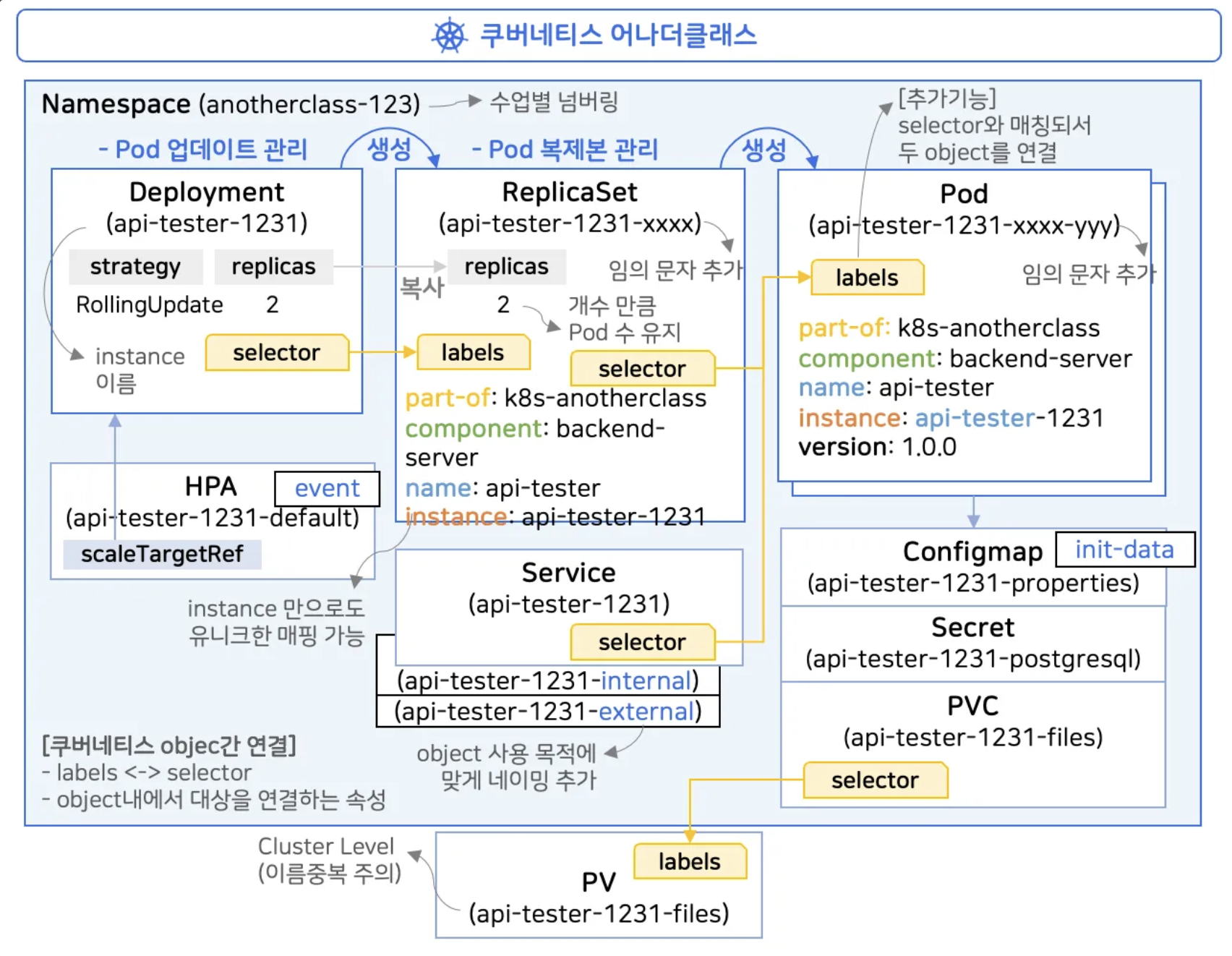
Deployment 동작
| Object | 동작 |
| 쿠버네티스 |
|
| ReplicaSet : Pod 복제본 관리 |
|
| Pod |
|
label 의 기능
- App 정보를 파악하기 위한 용도
- selector 와 매칭이 돼서 두 Object 를 연결
- select 의 내용이 모두 label 에 포함
- instance 이름이 고유하기 때문에 selector 에 instance 만 넣어도 매칭이 된다
⇒ selector & label : object 들을 매칭해 주는 역할
쿠버네티스 간 object 연결
- label ↔ selector
- object 내에서 대상을 연결하는 속성
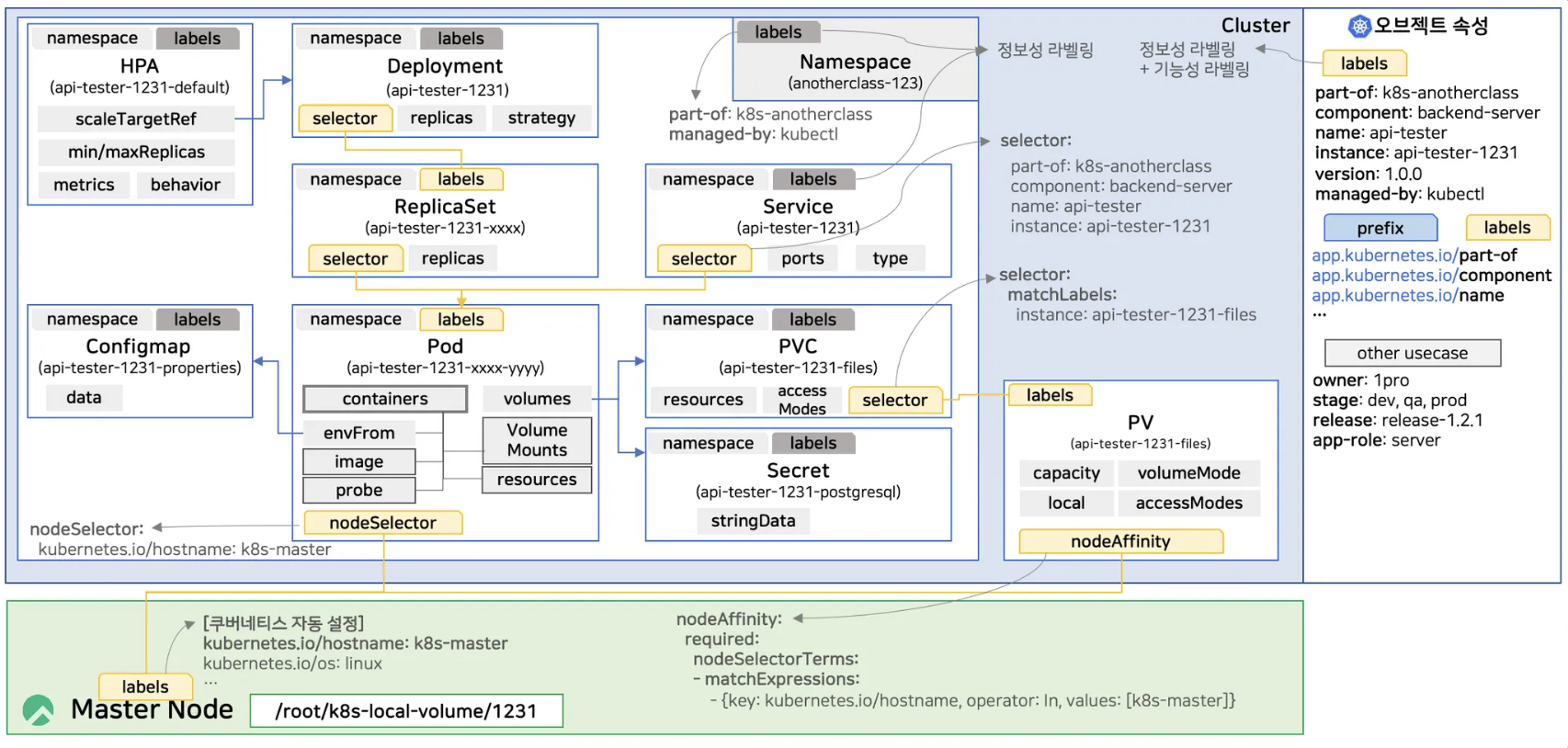
labels 의 역할
- 정보성 라벨링
- 정보성 라벨링 + 기능성 라벨링
- labels 앞에 prefix 를 붙일 수도 있는데 이는 도메인을 가리킨다. (옵션사항)
selector
- 여러 종류의 selector 들이 있고, 각각의 사용 방법이 조금씩 다르다
Service
selector:
	part-of: k8s-anotherclass
	component: backend-server
	name: api-tester
	instance: api-tester-1231
PVC
selector:
  matchLabels:
    instance: api-tester-1231-files
→ 잘 되어 있는 템플릿 하나만 두고, 복사해서 변경해야 하는 주요 값들만 변경해서 써도 된다
'🌱 인프런 > ⚓ 쿠버네티스 어나더 클래스 (지상편)' 카테고리의 다른 글
| (6) Configmap, Secret 이해하기 (2) | 2025.06.08 |
|---|---|
| (5) Probe 이해하기 (1) | 2025.06.02 |
| (3) 실무에서 느껴 본 쿠버네티스가 정말 편한 이유 (0) | 2025.05.29 |
| (2) 쿠버네티스 무게감 있게 설치하기 (0) | 2025.05.28 |
| [미션1] 쿠버네티스 설치 구간별 상태 확인 (1) | 2025.05.28 |